-
Starside Weekly – 12.05.2025
Your weekly update on Stars Reach
HIDDEN FOG UPDATE
The mists parted yesterday and a new update came into view. You can patch your Stars Reach Playtest app in your Steam library as you read this newsletter.
Day and night visuals were improved. Volumetric fog and improved terrain tiling were added. The overall effect of these changes can be dramatic and not all of the lighting values and tuning have been completed so more will improve over time. The volumetric fog does impact performance so we have set it as a preference in the escape menu – defaulted to off. (Hence the "hidden fog" reference.) Turn it on and experience it, watch it adapt to terrain height, then decide for yourself.
Expect caves and crevices to be darker (and benefit immensely from your light sources) as we have improved our global illumination model. Ambient occlusion is now computed more dynamically.
Our custom-made reflections implementation also takes ambient occlusion into account and now results in much better colors of metals, custom reflections on flora, and better performance. More details can be found here:
FIRESIDE CHAT SATURDAY
Our next Fireside Chat will be Saturday, December 6, 2025, at 9:00 AM Pacific. Dave Georgeson will join us to describe the new update and answer questions about our design choices, what we are working on next, and our roadmap in general.

You can watch the Fireside Chat live on Twitch.TV/PlayStarsReach.
CONTROLLED CHAOS INTERVIEWS DAVE GEORGESON
After carefully pouring over the public roadmap, Controlled Chaos had a list of questions for Game Director Dave Georgeson.
Dave's first answer immediately made us laugh. He explains his vision for the roadmap and how we use it.
PLAYTEST SCHEDULE

As the Fireside chat ends on Saturday, the playtest begins for Hidden Fog Update. Come join us for the briefing and the playtest which will run through to Tuesday morning USTZ as usual.
We will take advantage of a short downtime on December 9th & 10th for back end maintenance and improvements before resuming on December 11th.
LOGO MERCH AVAILABLE
We currently have three sets of logo merchandise in stock:
- The Transplanetary League set
- The Stars Reach logo set
- The Infinite Worlds set
You can visit the store here:

HOW YOU CAN HELP
If there is one thing you can do to help us, you can wishlist us on Steam. This makes a difference for the algorithm and also helps on the day we eventually launch on Steam. Thank you for this support.

-
Hidden Fog Update
Visual Upgrades
Day and night visuals were altered, volumetric fog and improved terrain tiling were added. The overall effect of these changes can be dramatic. Not all of the lighting values and tuning have been completed so more will improve over time.
NOTE: Volumetric fog has performance impact, so it defaults to OFF currently. You can turn it on in the Options menu.
Our visual upgrades in this update includes:
- We replaced the stock Unity point and spot light system with our own light grid solution which renders about 400x faster
- Our global illumination supports ambient occlusion and is automatically computed dynamically resulting in darker crevices and caves
- Our custom-made reflections implementation takes ambient occlusion into account and results in much better metals, custom reflections on flora, and better performance
- Automatic sky hue for different sky colors
- Map sized Volumetric Fog adapting to terrain height
Preamble
The initial screens you see after starting a new character have been pared way back. We (hopefully) kept the humor of those screens intact, but now there are only two of the "silently screaming" screens. Then you pick a basic character type and move into the Hallway experience.
Hallway
The initial user experience has been overhauled.
- To make the experience less claustrophobic, the hallways have been widened significantly.
- The "broken elevator shaft" that you climbed up wasn't obvious to many players, so it has been replaced with a ladder instead.
- A very large number of aesthetic improvements were made.
- The dialogs were simplified to make it much harder to become uncertain of what to do next.
- The lava room was removed entirely.
- The Professions Kiosks at the end of the hallway were removed entirely. Why? Because in the next Update, we're working on the Training Moon that comes after the Hallway and you'll be learning skills and gathering tools there instead. For now, every character will receive an OmniShock, Harvester, Terraformer, and Pathfinder when they start. This is temporary but necessary until we get the Training Moon functionality in place.
- The Chat Pane is closed while in the Hallway to avoid visual clutter. It opens again when you leave.
- You can now roll under the "Crouch" obstacle.
Identity Kiosk
At the start of the Hallway experience, you'll be able to interface with an Identity Kiosk. There, you'll be able to select from one of 64 visual appearances available in that kiosk, determining what your character will look like from that point onward.
We no longer randomly change your character appearance when zoning.
This is not a permanent feature, but is a bridge feature that we'll keep in place until much better character customization options are available in the near-ish future.
Basic NPCs
At the end of the Hallway, there's a Servitor (the same one you've been talking to while you moved through the Hallway). He doesn't do much at this point, but he was an experimental test so we could put into place the features needed to support basic NPCs going forward (which will be quite useful on the Training Moon).
In the future, you'll be able to customize NPCs for your Homesteads.
Miscellaneous Improvements
- The Starbase got a big update. The basement has been removed entirely. You now spawn into the Garden (of Life) via the Respawn Stations that have been moved there. There were also many significant visual upgrades as well as changes to reduce the number of objects used for performance reasons.
- The Wild Wormholes have been turned off currently, in favor of a "planet rotation" feature which will be fully explained later when that feature is ready for testing.
- A large number of art assets were introduced to add visual distinctiveness to many ores, plants, etc. when viewing your inventory. (This work is not yet complete, but we made good progress with this update.)
- A large number of performance improvements went into the game that should significantly improve framerate for many users.
- When you use a ReLife station, there is now a visual effect to make it more obvious that something happened.
- You should no longer see multi-boss spawns in various zones.
- The recipes for Soil-to-Metal or Soil-to-Gemstones have been removed because they were an early design that has been replaced and are no longer needed. Instead, we have the "adds" system so that when you extract soil, you occasionally get extra drops of the metal or gemstones you could make previously.
- Harvesting logs are now beneath the notice of the Servitors and will no longer trigger edicts.
- The Xyloslicer and Harvester have been improved with better targeting.
- GovBot missions now require less wood. We doubt anyone will be surprised by this.
- Many new fruits can be harvested. Seeds for fruit-bearing trees/bushes are now found when harvesting those fruits instead of when chopping them down.
- More new furniture and lights were added.
- The camera now defaults to Fixed-Reticle mode rather than Free-Reticle mode. Remember that "T" toggles your camera mode, as always. You can also temporarily switch it by holding the ALT key.
- Camera behavior in tight spaces has been greatly improved.
- You can now have private chats, as long as you're on the same world. If you use /tell to message another player, it opens up a new chat channel where you can chat back and forth. This does not work across servers yet, but we're working on it!
- Some of you may have noticed a while ago that we did some tests with client prediction on firing certain tools and then removed the feature. Those initial tests only worked for those specific tools but client prediction is now back with a more generic model so all projectile weapons will see you fire them immediately without waiting on a server response. There are still some iterations coming to improve this feature further and fix edge case bugs but you can disable it in the Options menu if you have any issues with it.
-
Starside Weekly – 11.26.2025
Your weekly update on Stars Reach
NEW UPDATE NEXT WEEK
We have not yet announced what is coming in next week's update but savvy observers have been watching our public roadmap.
Update notes will be posted next week. We will leave you some surprises for that post, but here's the roadmap in the meantime.

FIRESIDE CHAT
Our next Fireside Chat will be Saturday, December 6, 2025, at 9:00 AM Pacific. Dave Georgeson will join us to describe the new update and answer questions about our roadmap and design choices.
NEW PLAYER ONBOARDING LIVESTREAM
Did you know that nearly anything in this game is (or will be) interactable? You just need the right tool. Most new players miss this (as we watch them on livestream or video.) There is so much to learn. So we're going to try something new: hands-on new player onboarding.
Thursday, November 27, we will feature new player training for our weekly livestream. Everyone is welcome to join us in the game and we'll help you get up-to-speed on Stars Reach. Or shy folks can watch us on Twitch.TV from a safe distance.
When the playtest opens at 9:00am Pacific (noon Eastern), please launch the game from your Steam library, create a new character, and make your way down the initial hallway. When you go through the gateway at the end of the hallway, you can then join us on the TPL Space Station.
CONTROLLED CHAOS INTERVIEWS LIGHT BATES
Technical Designer Light Bates explains elements of the GovBot update, the dev team's reactions to how the players interacted with the GovBot, and tries not to leak anything too sensitive. And something about spam.
PLAYTEST SCHEDULE

The playtest continues with GovBot Update from Thursday (US Thanksgiving) morning through Tuesday morning, December 2, (119 hour test). Then next week we are installing a new game update with a quick initial test on Thursday, December 4, 2025.
LOGO MERCH AVAILABLE
We currently have three sets of logo merchandise in stock:
- The Transplanetary League set
- The Stars Reach logo set
- The Infinite Worlds set
HOW YOU CAN HELP
If there is one thing you can do to help us, you can wishlist us on Steam. This makes a difference for the algorithm and also helps on the day we eventually launch on Steam. Thank you for this support.
-
Starside Weekly – 11.21.2025
Your weekly update on Stars Reach
ON THE GOVBOT UPDATE
The GovBot update is the talk of the town right now but perhaps you have not read through the entire patch notes: https://starsreach.com/govbot-update.
If you prefer to hear about it firsthand from one of the designers who worked on it, you can listen to the interview with Technical Designer Light Bates.
FIRESIDE CHAT
If you missed last weekend's fireside chat, you can hear another take on the most recent update from Game Director Dave Georgeson.
Also, Dave spends time talking about the roadmap and our priorities.
PUBLIC LIVING ROADMAP
Last week we posted our public, living roadmap and told you about it. Some of you quickly realized you can click on individual cards for more information.
What others didn't realize is that we are updating it frequently. We've updated it four times since posting it. It's worth revisiting regularly.
We haven't received a lot of feedback other than you like it. We were expecting more questions and more comments on priorities.
MMORPG EXPLAINS STARS REACH ROADMAP
MMORPG.com commented on our roadmap that we are "aiming for accountability and transparency about which features are planned and in that pipeline."
The author explains that we are in "full-fledged development testing, with occasional updates and playtests shared from the team."

CONTROLLED CHAOS' FIRST YEAR OF PLAYTESTING
This past year has been a journey of playtesting for Controlled Chaos. He takes us through the progression he experienced, the highlights of his year, and the feelings that were engendered.
In the famous words of Virginia Slim's, "We've come a long way, baby."
CONTROLLED CHAOS ALSO EXPLAINS THE GOVBOT UPDATE
Did you know that the GovBot update lets you rule a planet in Stars Reach?
While one might ask our first official major of any city in Stars Reach, Dr. Drake Vellaut, it turns out that one could also ask Controlled Chaos about this subject!
PLAYTEST SCHEDULE

The playtest continues with GovBot Update from Thursday morning through Tuesday morning, December 2, USTZ (119 hour tests).
LOGO MERCH AVAILABLE
We currently have three sets of logo merchandise in stock:
- The Transplanetary League set
- The Stars Reach logo set
- The Infinite Worlds set
You can visit the store here: https://starsreach.com/store
HOW YOU CAN HELP
If there is one thing you can do to help us, you can wishlist us on Steam. This makes a difference for the algorithm and also helps on the day we eventually launch on Steam. Thank you for this support.
-
Starside Weekly – 11.14.2026
Your weekly update on Stars Reach
*NEW* GOVBOT UPDATE
The GovBot is a Transplanetary League construct that serves two purposes:
- It's a sequence of tasks that a group of planetary pioneers can use to establish a township on a new planet, and;
- It enables the tools that the government of that new township will need to maintain and grow the planet going forward.
Citizenship
Players may (optionally) become citizens of a specific planet. To do so, go to the GovBot on a planet, access the kiosk and choose to become a citizen there.
If you are already a citizen on another planet, you'll have to renounce that citizenship first before you can become a citizen elsewhere.
You cannot access any other GovBot functionality until you become a citizen of that planet.
The First Mission
GovBots have levels, and they start at level 1. To move to the next level, the citizens of that planet must rally together to bring resources and Klaatu to the GovBot. Once they Deposit enough materials and currency in the GovBot, the mission will complete and new functionality will be unlocked for the township.
The first goal is to unlock a Missions Kiosk for the planet.
When the first mission is completed, the Mayor will be notified of the community's success and the next mission will automatically begin.
This is a small fraction of the important information in this update. Please find the rest here:

PUBLIC LIVING ROADMAP
Today, we reveal our Stars Reach development roadmap. We built something more than just a timeline, but a living page!
You can click on individual cards for more information. Additionally, watch cards move between categories (forward and backward) as development progresses.
We want your feedback, so don't be shy and let's hear some typing on those keyboards!
MASSIVELYOP REMARKS ON RESEMBLANCE TO SWG
MassivelyOP warmly compared Stars Reach's new government system to the original government system in Star Wars Galaxies. The commenters agreed with the writer on the strong resemblance to the cherished memories of SWG.
[READ MORE]
MASSIVELYOP SAYS WE'RE HAVING A HELLUVA WEEK!
They watched the new Servitors video by Stars Reach Lab. They checked out our living roadmap, comparing it to a Trello board, but might not have noticed that one can click on a tile and open it for more details.
They are right. We're having a great week!
Explore the full article →
STARS REACH LAB: THE SERVITORS
The Lab series continues with a look at The Servitors.
The old ones left their garden of planets in the care of their faithful Servitors. They care for us, for our planets, and all the flora and fauna living on these worlds.
Endlessly polite, they may still schedule you for termination with the right motivation.
PLAYTEST SCHEDULE

Saturday's Fireside Chat is our 50th Fireside Chat. Dave Georgeson will be joining Carneros to break down the new update and talk about our newly-posted development roadmap.
LOGO MERCH AVAILABLE
We currently have three sets of logo merchandise in stock:
- The Transplanetary League set
- The Stars Reach logo set
- The Infinite Worlds set
You can visit the store here: https://starsreach.com/store
HOW YOU CAN HELP
If there is one thing you can do to help us, you can wishlist us on Steam. This makes a difference for the algorithm and also helps on the day we eventually launch on Steam. Thank you for this support.
-
GovBot Update
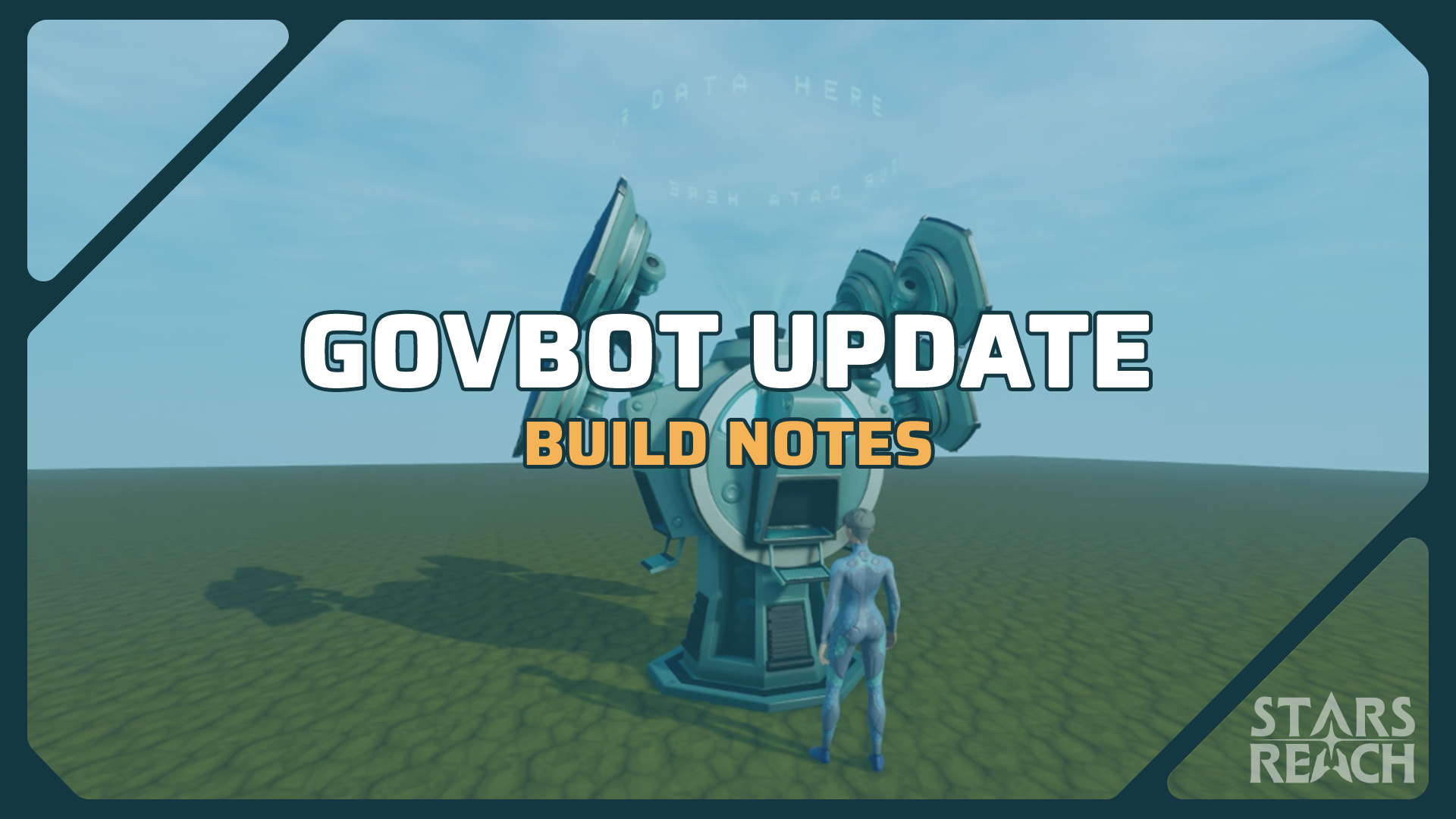
The GovBot
The GovBot is a Transplanetary League construct that serves two purposes:
- It's a sequence of tasks that a group of planetary pioneers can use to establish a township on a new planet, and;
- It enables the tools that the government of that new township will need to maintain and grow the planet going forward.
Citizenship
Players may (optionally) become citizens of a specific planet. To do so, go to the GovBot on a planet, access the kiosk and choose to become a citizen there.
If you are already a citizen on another planet, you'll have to renounce that citizenship first before you can become a citizen elsewhere.
You cannot access any other GovBot functionality until you become a citizen of that planet.
The First Mission
GovBots have levels, and they start at level 1. To move to the next level, the citizens of that planet must rally together to bring resources and Klaatu to the GovBot. Once they Deposit enough materials and currency in the GovBot, the mission will complete and new functionality will be unlocked for the township.
The first goal is to unlock a Missions Kiosk for the planet.
When the first mission is completed, the Mayor will be notified of the community's success and the next mission will automatically begin.
GovBot Missions
After the initial Missions Kiosk is unlocked, successive missions unlock the ability for a township to have its own:
- Tools shop
- Public crafting stations
- Planetary bank
- University (skills kiosk)
- Planetary ecology console
- ReLife facilities
- Title shop
Missions that will become available later (after further development) will include:
- Power facility
- Theater
- Spaceport
- Vehicle garage
- Teleportation hub
Mission Rewards
Citizens will earn Citizenship Points (CP) as they contribute to the current mission, and CP may be redeemed for bonuses as you go. There are currently two kinds of rewards you can earn by spending your CP:
- Learning Engrams: These items are consumable and when used, they increase the rate at which you earn XP for whatever tasks you are doing for the next 15 minutes.
- Skill Chits: These items allow you to zero out the cost of a skill unlock at the Skills Kiosk. They are auto-consumed when you unlock a skill if they exist in your inventory.
These mission rewards are tradable between characters. The largest contributor (most CP added) to a task also earns special titles available only to that set of overachiever players. The more times you become the major contributor, the more titles you can unlock.
The First Mayor
A Mayor controls the laws for the planet. The first Mayor for the new township is always the largest contributor on the First Mission.
Is that Mayor going to be in that role forever? Not necessarily. (See "Voting" below.)
The Mayor can utilize the Klaatu that have been contributed during missions to unlock Zoning Lots, acquire Township Kiosks, and also can set general laws for the planet.
Voting
After a Mayor exists on the planet, every citizen has one vote they can cast for the next Mayor.
Every two (real-world) weeks, a new election occurs. A simple majority of votes decides who wins.
When a Mayor is elected, all player votes are automatically changed so they vote for that Mayor. This is intentional and favors the incumbent staying in power unless the citizens of that planet rally together and decide on a change.
To change your vote, just go to the GovBot, choose the Voting option, and change your vote from the current Mayor to another citizen instead. When the next election occurs, the majority winner becomes the new Mayor.
NOTE: If you absolutely do not want to be Mayor, there is a toggle next to your name allowing you to opt out of any future elections.
Mayoral Abilities
The Mayor is the great organizer of options for the township, but a good Mayor will often recognize that it's easier to get stuff done by working with others.
Additionally, a planet that is ripped up, is poorly coordinated, or is just generally unappealing is unlikely to attract many citizens, and without citizens, the government will never progress.
So it's up to the Mayor to make things happen. Here are the tools the Mayor uses to do those things.
Zoning Lots
Zoning lots are, in effect, exactly like Homesteads, but they belong to the township, not to an individual.
The current Mayor always has edit privileges on all Zoning Lots. The Mayor may also set editing privileges allowing other players to edit those Zoning Lots.
All Zoning Lots have greatly increased permission settings. Each of the following options can be set to either "Owner only" (in this case, that's the Mayor), "Citizen only", a specific list of designated people, or "Anyone". The permissions that can be set on that Zoning Lot are:
- Mining
- Lumbering
- Chronophasing
- Paving
- Building
- Burning
- Farming
A clever Mayor can not only set up Zoning Lots for specific types of buildings (allowing groups of selected players to take on construction projects), but can also use Zoning Lots to protect parklands, designate roadways, etc.
Upgrades
As the community completes missions, various kiosks become available to add to the township. The Klaatu that was contributed during those missions is stored in the GovBot and the Mayor can access those funds to purchase Kiosks and to purchase Zoning Lots. These are collectively called "Upgrades" and are accessed via the GovBot.
Kiosks
The Mayor may purchase as many kiosks as desired and those can be placed on any Zoning Lot on the planet. That kiosk is added to their inventory and is placed using the Fabricator. They may be traded.
Zoning Lots
The Mayor can also purchase Zoning Lots. A Zoning Lot object appears in their inventory and can be placed (like a Homesteader object) anywhere on the planet. Zoning Lot objects may be traded.
Global Permissions
The Mayor may also set global permissions for the planet. These include:
- The ability to personally approve citizenship applications
- To allow voting (yes, the Mayor can decide to be a dictator and not allow elections!)
- Setting permissions for specific citizens
- Adding titles to citizens (for example, if the Mayor wants to designate a council)
- Building permissions (allowing/disallowing building)
- Mining permissions (allowing/disallowing mining)
- The ability to spend GovBot funds on Zoning Lots or kiosks
Other Improvements
A lot of our focus this sprint was on the GovBot, but other improvements were made also. Here's a list:
- The wild wormholes are going to close for a bit. (Don't worry, they will return in the future!) You will have four regular planets to play on. After a while, the least used is going to be lost as the Servitors destroy the portal and point it at a new world. It's going to be down to your activity to determine which that is. We are doing this because we need to test the dynamic for the later game. We will not be packing up your homesteads automatically, but we WILL be fixing your used homestead count when it happens.
- The great flora conversion is finally completed. We'll do one last flora wipe this time and then leave it alone in the future (hopefully!)
- There are a few new furniture pieces! A couple of stools, two end tables, a table, a barrel and a canister. This is just a start. A new "Furniture Set" is available for unlock in the Architect skill tree and the pieces are made at the Lathe.
- We added some curved wall pieces to the game also. Large and small curves for walls, windows, ceilings and floors are added to a new "Curved Set" available for unlock in the Architect skill tree.
- Crafting stations and the Ecology Kiosk no longer exist at planetary portals. (You have to earn them via GovBot now.) The ReLife station is still there and you can still refit, of course. So be sure to use your Camps!
- Chef and Medic have been added as titles in the Title Shop.
- Enabled temporal anti-aliasing to create cleaner rendering.
- Added a placeholder map page (it doesn't function yet but people kept asking if we were going to have a map…and the answer is yes.)
- /camp has been removed from the game. If your character gets stuck in the world somehow, use the /stuck command to get moved to the surface instead.
- The Refinery is part of the Camp3 skill node upgrade now and will be placed when you place a camp after unlocking that skill node.
- Fixed an error with the Terraformer that made its extraction mode underpowered.
- The Bank now holds 100 items (instead of 60)
- The Homestead Crates now hold 25 items (instead of 10)
- Terraformer and Chronophaser were improved in effect, buffing them somewhat regardless of PQRV stats. (All stats are lifted equally.)
- Mining tailings in space now evaporate over time.
-
Starside Weekly – 11.07.2025

Your weekly update on Stars Reach
IMPORTANT UPDATE NEXT WEEK
Our next content update, scheduled for next week, will be an important one. This will be the "GovBot Update" introducing player self-governance, claiming a planet, choosing a town mayor, the mechanics of zoning your town, citizenship, and much more.
The team has been working hard on this, and we're excited for you to try it.
FULL RESET COMING WITH GOVBOT UPDATE
There is a larger scope to the testing of this next update. After all, the GovBot Update includes the planet ownership feature first revealed in our Kickstarter reward tiers.
To implement it (and also to evaluate it), we will need to do full character wipes. Character wipes would also break ownership ties to homesteads effectively orphaning the beautiful constructions on Akacala and other planets. The solution is a full wipe.
We are telling you this now so you can plan, screenshot, record video, etc.
REDBEARDFLYNN COMMENTS ON VISUAL UPDATES
Redbeardflynn is excited for these visual upgrades but also for what comes later down the line when we also update visuals for hard surfaces, creatures, and characters. He calls this a huge step in the right direction (and we agree with him!)
PLAY WITH THE DEVS + CONCEPT ART LEAKS
Yesterday's livestream includes a group play session on Akacala with a break to look at concept art for upcoming kiosks of various sorts. We also looked at the newest in-development version of the drone light providing illumination on a dark night.
These streams are Thursdays at 9:00 AM Pacific/noon Eastern. You are welcome to join us in game, watch us on Twitch.TV/PlayStarsReach, or catch the recordings.
NIGHT OF THE VEIL EVENT
Courtesy of the Galactic Union of Natural Conservation (GUNC), we have our first player-created holiday event known as the Night of the Veil. Come along on this video record of the event and see what you missed.
THE LAST DAYS OF AKACALA-VEGAS – AKAVEGAS
Chef Jerek pays homage to the amazing city that developed near the travel portal on Akacala. Very creative, Chef!
COMMUNITY POWER: GUNC GUILD
Join Thomas for the first episode of a new series called Community Power.
The goal of these videos is to showcase what players do or create when playing Stars Reach. We'll interview members to learn the culture, goals, and activities of the group.
This first episode features GUNC, the Galactic Union of Natural Conservation.
PLAYTEST SCHEDULE
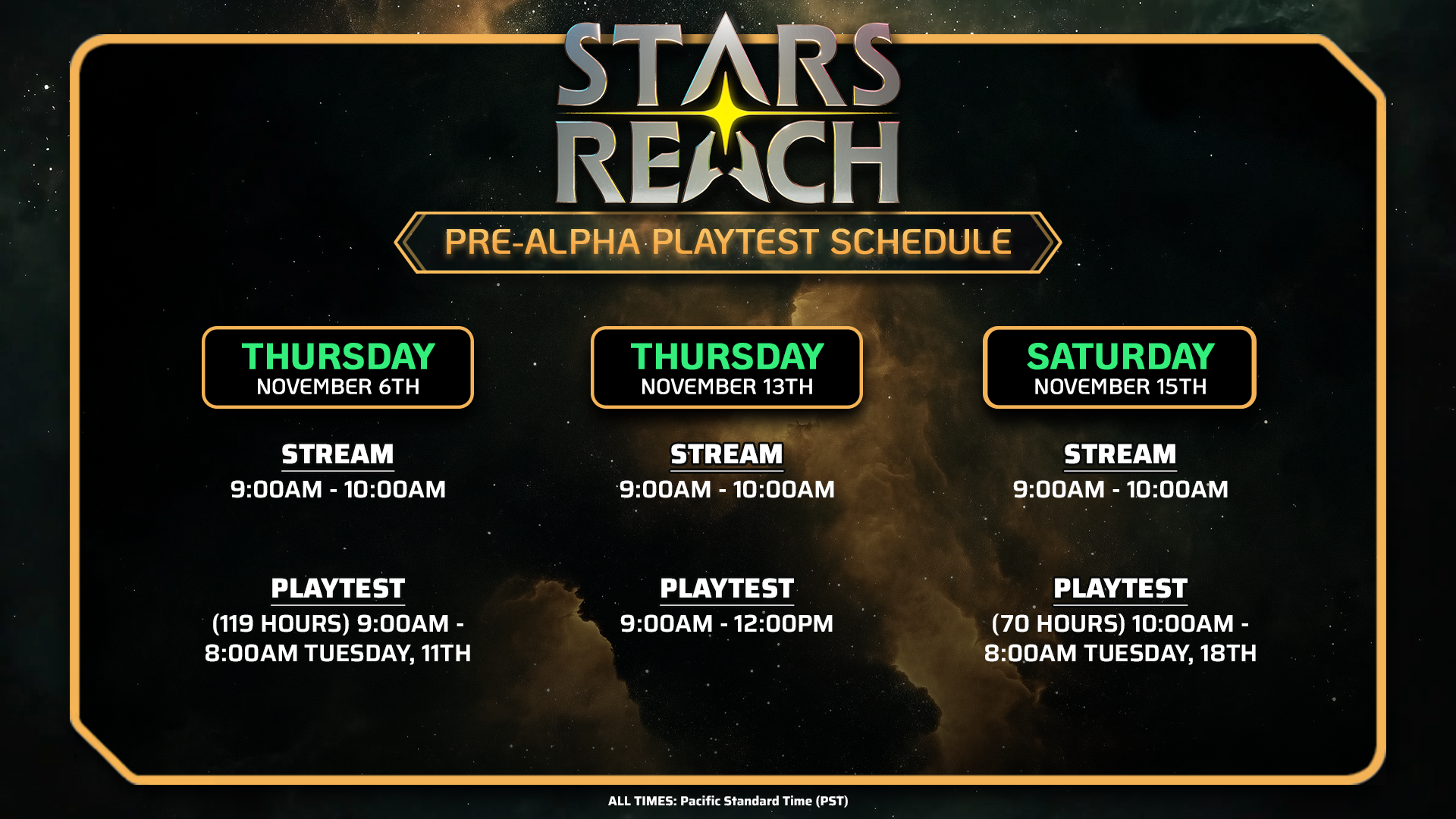
LOGO MERCH AVAILABLE
We currently have three sets of logo merchandise in stock:
- The Transplanetary League set
- The Stars Reach logo set
- The Infinite Worlds set
You can visit the store here:
HOW YOU CAN HELP
If there is one thing you can do to help us, you can wishlist us on Steam. This makes a difference for the algorithm and also helps on the day we eventually launch on Steam. Thank you for this support.
-
Starside Weekly – 10.31.2025
Your weekly update on Stars Reach
RAPH EXPLAINS VISUAL UPDATES
For months now, we have been working on a big overhaul to the visuals in Stars Reach. This has involved redoing most of the shaders in the entire game, and going back and retouching every asset. We started by redoing all the plant life and flora, and we have hundreds of those assets that had to be redone.
Further, they all need to grow, change in response to seasons, be able to catch fire and burn, freeze, shed leaves and die, and so on. The right plants grow in the right places based on the temperature and the humidity and the soil types.
All that means that every tree you see in the game grew there, and propagates across the landscape just like real plants. Seeds fall and grow into trees, forest fires happen and so on.
More details are here: Raphkoster.com
STARS REACH LAB PRESENTS: BIOMES UPGRADE VIDEO
We continue our series on incoming visual upgrades (and in some cases performance upgrades at the same time.)
Gorgeous volumetric fog effects, seasonal changes, reactions to frost and fires, multiple biomes, day/night cycles, hydrology changes, and alien species are visually portrayed.
FULL RESET COMING WITH GOVBOT UPDATE
Our next major update is a big one. We will be calling it GovBot Update and it includes the planet ownership feature first revealed in our Kickstarter reward tiers. More details on GovBot Update coming soon.
To implement it (and also to evaluate it), we will need to do full character wipes. Character wipes would also break ownership ties to homesteads effectively orphaning the beautiful constructions on Akacala and other planets. The solution is a full wipe.
We are telling you this now so you can plan, screenshot, record video, etc.
MMORPG.COM & MASSIVELY OP NOTE NEW GRAPHICS AND RAPH'S BLOG
"Almost unrecognizable" and "major visual improvements", they said.They reference and quote Raph's devblog describing the new updates and how they are being added to the game. And MMORPG explains how the biomes are simulations rather than pre-designed settings.
Please read both articles here:

CODE & CRAFT PODCAST INTERVIEWS LIGHT
Code & Craft sat down with Playable Worlds Technical Designer Light Bates to learn more logic and design philosophy behind Stars Reach. They talked about creative problem-solving, building worlds that feel alive, what it really takes to bring vision and engineering together in modern game development, and about Light's own journey into game development.
FIRESIDE CHAT – OCTOBER 25
If you missed Dave Georgeson and Rick Reynolds' Fireside Chat on October 25, we have a recording of the livestream.
This is the introduction of Vendor Kiosk Update with some of the thinking behind the features in the update.
PLAYTEST SCHEDULE
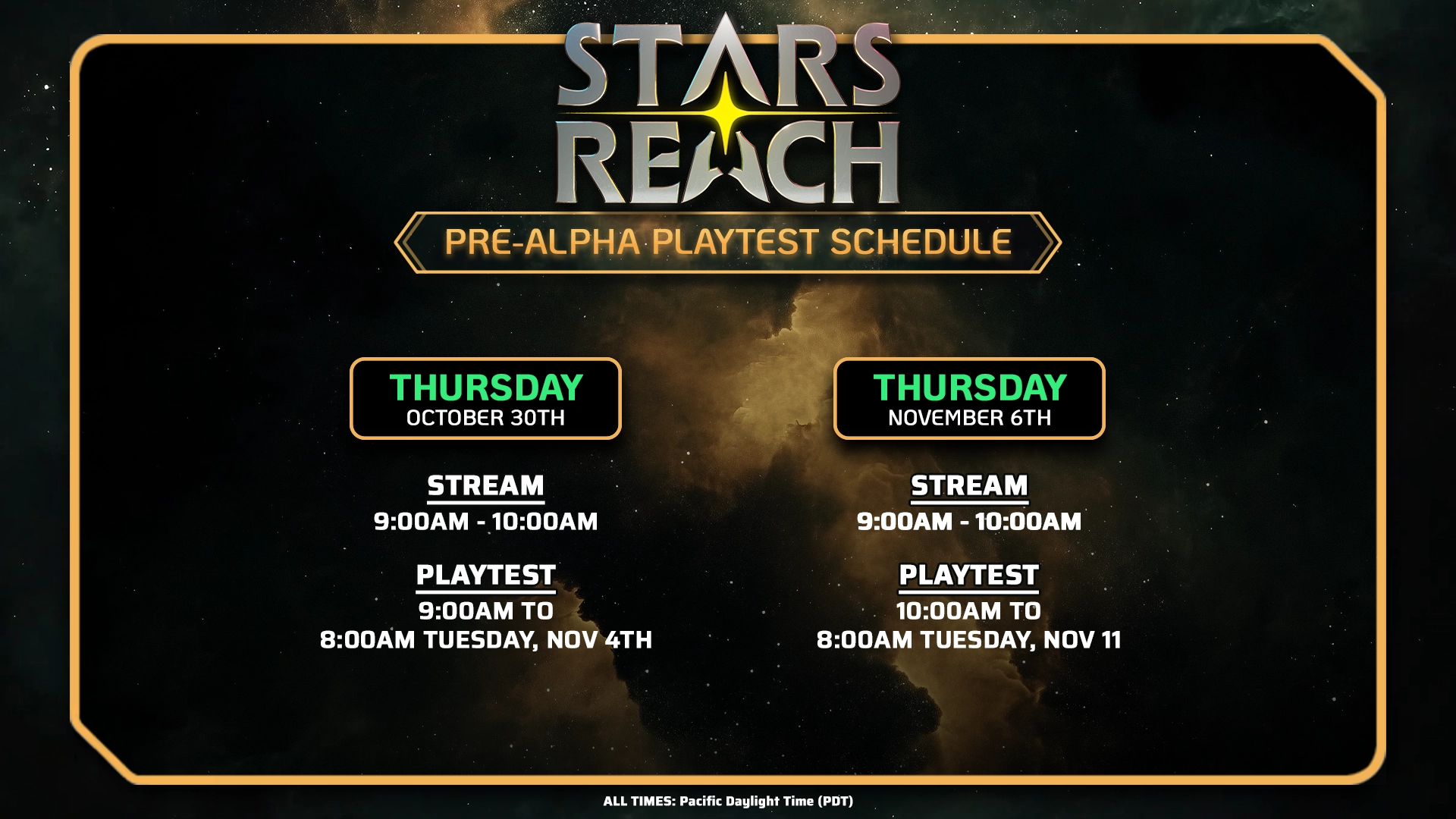
We are testing the Vendor Kiosk Update built and new items include the bank in the TPL starbase, homestead crates providing new storage on your homesteads (limit 3 per homestead), and the titular vendor kiosks you can place on your homesteads.
As usual, tests are currently running from Thursday morning straight through to Tuesday morning.
PLAYED WITH THE DEVS LIVESTREAM
If you missed Thursday's Play-with-the-devs livestream, our plan was to show the new bank in the space station, then move to Akacala and tour the local shopping just added this week. We saw the breadth of offerings, the prices, and the organization. Some folks even placed multiple vendor kiosks side-by-side differentiated by the categories of goods for sale within.We then visit a homestead and built a Homestead Crate for storage and then a Vendor Kiosks so you could see the building and
PLAYABLE WORLDS CO-FOUNDER SPEAKING AT GAMESBEAT NEXT
GamesBeat Next runs Wednesday and Thursday, November 12 & 13 in San Francisco.It's a conference for games industry executives and their support services.
Playable Worlds President and Co-founder Eric Goldberg is moderating a panel on Games M&A at noon on November 13.

The full agenda can be seen on the Gamesbeat website.
LOGO MERCH AVAILABLE
We currently have three sets of logo merchandise in stock:
- The Transplanetary League set
- The Stars Reach logo set
- The Infinite Worlds set
You can visit the store here:
HOW YOU CAN HELP
If there is one thing you can do to help us, you can wishlist us on Steam. This makes a difference for the algorithm and also helps on the day we eventually launch on Steam. Thank you for this support.
-
Starside Weekly – 10.24.2025
Hello Reachers!
Yes, we have a new update for you to test. We named it after the Vendor Kiosk feature, but it also includes a bank, a storage crate, and a minor Halloween event.
Vendor Kiosk Update
You can now place a kiosk on your claim that you can use to sell things to the general public in game.
The recipe unlock is automatic for the moment and part of the Business skill tree. Everyone gets it for free at the moment.
To create a Vendor kiosk, go to the Lathe and use the recipe you find there for it. Once it is crafted, you can go to one of your Homesteads and place the kiosk there. You place the kiosk with the Fabricator, so you'll need one of those before you can do so. NOTE: You may only have one Vendor kiosk per Homestead.
Any player may open the Vendor kiosk after it is placed and they can buy any item found there.
Only players with editing permissions on that Homestead can post items to sell into that kiosk.
Click the BROWSE button in the upper, left of the screen. All the items that you (or other players with edit permissions) have made available for sale are in those listings. Click on any item to get a Purchase dialog.
To put an item up for sale, click the SELL button in the upper left of the screen. Then just drag-and-drop any item or stack of items from your inventory onto the right side of the screen. You can set the price and authorize the sale.
You need to come back to the Vendor kiosk to collect the money from any sold items. Click the SELL button to see your listings then click the coin icon to collect the Klaatu.
Bank
The Bank is found in the Starbase. You can access the Bank kiosk and then drag-and-drop items, or stacks of items, from your inventory to the bank vault. You can then return to the bank at any time and recover those items by dragging them back into your inventory.
Homestead Crates
You can now create Homestead Crates and place them on your Homestead for additional storage.
You unlock the Homestead Crate recipe by unlocking the Architect skill tree.
You build the Homestead Crate at the Lathe.
After it is in your inventory, you place it like any other Building Tile by using the Fabricator.
Only yourself and people that you give permission to edit your Homestead will be able to access crates placed on that Homestead. (Later on, we'll add more granular permission settings, but that's how it is for now.)
Halloween
We have also included a very small Halloween event but we are not explaining it. You will need to discover it yourself.
More details are here: Vendor Kiosk Update – Stars Reach
 We are patching the current build and will open the playtest servers tomorrow. Then we go back onto our usual Thursday-through-Tuesday morning rhythm.
MASSIVELY OP AND MMORPG COMMENT ON NEW UPDATE
- MMO specialist press have been keeping an eye on our progress and commented this week. We appreciate their support.
- Stars Reach Adds a Vendor Kiosk to Buy & Sell, New Mission Tiers, More Storage, and a Surprise Halloween Event
CONTROLLED CHAOS CREATED A VIDEO ON VENDOR KIOSK UPDATE
Chaos takes us through the various new functionality and how to use it. He explains one known bug but it might be gone by the time you log into the game.
He also comments on art and terminology changes and smaller things that might go unnoticed
STARS REACH LAB: JUNGLE BIOME
This is a work-in-progress video showing some of the new plants and vegetation, while also demonstrating how seasons, light, and some initial player interactions affect the living world.
PLAYED WITH THE DEVS LIVESTREAM
If you missed Thursday's Play-with-the-devs livestream, our plan was to explain the game, explain the wild wormholes, and take a group to the wild planet.
We did this and explained good resources to harvest on this temporary planet. And of course there were some combat shenanigans.
FIRESIDE CHAT – OCTOBER 25
Please join Dave Georgeson (Qix) and Rick Reynolds (Carneros) at our next Fireside Chat at 9:00 AM on Saturday, October 24, 2025.
We will be introducing the Vendor Kiosk Update and answering your questions.
Join us on Twitch.TV/PlayStarsReach. Saturday, October 25 at 9:00 AM Pacific / noon Eastern.
LOGO MERCH AVAILABLE
We currently have three sets of logo merchandise in stock:
- The Transplanetary League set
- The Stars Reach logo set
- The Infinite Worlds set
You can visit the store here: https://starsreach.com/store/

HOW YOU CAN HELP
If there is one thing you can do to help us, you can wishlist us on Steam. This makes a difference for the algorithm and also helps on the day we eventually launch on Steam. Thank you for this support.
-
Vendor Kiosk Update

Vendor Kiosk
There is now a Vendor kiosk available to you!
The recipe unlock is automatic for the moment and part of the Business skill tree. Everyone gets it for free at the moment.
To create a Vendor kiosk, go to the Lathe and use the recipe you find there for it. Once it is crafted, you can go to one of your Homesteads and place the kiosk there. You place the kiosk with the Fabricator, so you'll need one of those before you can do so. NOTE: You may only have one Vendor kiosk per Homestead.
- Any player may open the Vendor kiosk after it is placed and they can buy any item found there.
- Only players with editing permissions on that Homestead can post items to sell into that kiosk.
Purchasing Items from the Kiosk
Click the BROWSE button in the upper, left of the screen. All the items that you (or other players with edit permissions) have made available for sale are in those listings. Click on any item to get a Purchase dialog.
Posting Items for Sale into the Kiosk
To put an item up for sale, click the SELL button in the upper left of the screen. Then just drag-and-drop any item or stack of items from your inventory onto the right side of the screen. You can set the price and authorize the sale.
NOTE: There is a non-refundable listing fee each time you place something up for sale, and that is currently 5% of whatever the amount you are listing the item for.
There is a minimum cost of ten Klaatu per individual item, so a stack of 100 items will have a minimum sale price of 1000 Klaatu.
You need to come back to the Vendor kiosk to collect the money from any sold items. Click the SELL button to see your listings then click the coin icon to collect the Klaatu.
You can list a maximum of 100 items on your Vendor Kiosk.
Bank
The Bank is found in the Starbase. You can access the Bank kiosk and then drag-and-drop items, or stacks of items, from your inventory to the bank vault. You can then return to the bank at any time and recover those items by dragging them back into your inventory.
Homestead Crates
You can now create Homestead Crates and place them on your Homestead for additional storage.
- You unlock the Homestead Crate recipe by unlocking the Architect skill tree.
- You build the Homestead Crate at the Lathe.
- After it is in your inventory, you place it like any other Building Tile by using the Fabricator.
- Only yourself and people that you give permission to edit your Homestead will be able to access crates placed on that Homestead. (Later on, we'll add more granular permission settings, but that's how it is for now.)
Halloween Event
- There is a (minor) event. But we're not giving you details so there are some surprises. Enjoy!
- It starts when this update goes Live and ends on November 1st.
Miscellaneous Improvements
- Large glass walls and corners are added to the game. These are unlocked through the "Windows and Walls" skill node in the Architect skill tree. If you already have that unlocked, you'll have access to the new tiles.
- Mission and Ecology kiosks have visual upgrades.
- There are now Tiers of missions available on the Mission kiosk. The more difficult tiers will be further away from the portal, requiring more travel time, but rewards are greater also.
- A large number of flora items (trees and bushes) were improved, resulting in higher performance, but we'll need to do another flora wipe to make them show up in game. Apologies to those of you that made gardens.
- If a creature is immune to a status effect, you will now see text flyouts occur letting you know.
- The "Bare" versions of soils that are in the game will no longer generate separate types of doobers. Previously, as an example, there were "Bare Alluvial" and "Alluvial" soil types. Those are still in the game, but you won't notice it as much now because regardless of which type you extract, you will only get "Alluvial" soil now.
- Repeatedly walking the same path across grassy areas will now start to form trails of bare soil.
- The Planetary Health status is broadcast to all players regularly.
- The Chat Pane has been improved and now has two channels. More channels are forthcoming after we test this further and enable a back-end piece that we're still working on currently.
- The "Stunt" function on the Pruning Tool now has a VFX associated with it.
- Hitting ESC will now close announcements and hint dialogs.
- "Inventory" is now called "Backpack"
- Chat pane now defaults to open.
Bug Fixes
- Fixed a reference on the Weaponsmith skill tree to say "Corrosion Drones" instead of "Acid Drones".
- Using the "Dupe" function on the Fabricator will no longer allow you to exceed building limits.
- Errors with seed artwork that resulted in them showing random icons instead of the proper art have been fixed.
- Crafting Pharmacology recipes now generates Medical XP (instead of Cooking XP).
- Crafting Power Cell recipes now generates Crafting XP (instead of Cooking XP).
- You no longer get a Health Wound when you die during the first-time user experience hallway.
- We no longer spam the chat pane every time you place a building tile.
- Fauna (creature) totals on the Ecology Kiosk have been corrected.
- Improved calculation and handling of marketplace stack listings.
Alcance de las estrellasstarsreachteam2024-05-30T13:05:17-07:00